
Why OpenOffice.org needs Kerning

This text is not kerned:
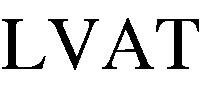
As you can see, the space between the glyphs is just too wide.
This text is kerned:
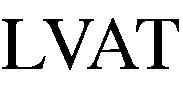
Now, the spacing between the glyphs looks more natural and
eye-pleasing.
For most other glyphs, the necessary corrections are much smaller.
But the resultant text will always look nicer and be easier to read,
although most people will not be able to explain exactly why.
Kerning is controlled by information in the font data (in particular the font metrics). Fonts that do not need such precise corrections, like fixed width fonts, will not be subject to kerning.
OpenOffice.org supports kerning, but does not do this by default. You have to specify for each document and each style whether to use kerning or not. This is a big hassle. Not many users will do this.
As a result, when OpenOffice.org is used to produce a printed document, it will not look as nice as if it had been printed by, for example, Microsoft Office. This will make people believe that OpenOffice.org produces inferior results, and people will stick to Office.
OpenOffice.org has a lot of features, and most of them are enabled by default. Despite several discussions on the mailing lists I still haven't heard one single argument for not enabling kerning by default on new documents. The kerning status of existing OOo documents may not be changed since that would (theoretically) lead to small changes in the documents. But there is no reason to not enable kerning by default on all newly created documents, including documents converted from MS-Office formats since MS-Office has kerning enabled as well.
Edit January 2007: The next version will have kerning enabled by default. Finally.
© Copyright 2003-2018 Johan Vromans. All Rights Reserved.
OOo/ookerning.html last modified 23:13:23 26-Feb-2007